Our Mobile Development forum is the place for Q&A-style discussions related to writing software applications for iOS and Android devices.
1,172 Archived Topics
Remove Filter

Please don't post "spam" or "Thank you" posts in this thread since this is meant to be used as a guide for all beginners and I am sure we would like it to be on topic. I hope you understand this. For these of you who would like to learn …
Hey I want to Develop A mobile app in android for my food business. Can anyone suggest me any company and the cost of the App? Thanks

Here is simple example of static image to be displayed as logo on the start-up/splash screen. This can be improved by creating animation out of series of images or use of flash file through [URL="http://developer.sonyericsson.com/site/global/newsandevents/latestnews/newsapr08/p_project_capuchin_announcement.jsp"]Project Capuchin[/URL] library. As for location of image file this was placed in new folder called …
Hi all, My team and I is making an open-source library for running AI models on the phone. We are planning to create a very simple SDK which will allow you to download a model and use it on your phone. We plan to release an initial version in a …


## Introduction ## When working with Hilt, you might have wondered how to inject ViewModels into your application. In this tutorial, we will learn how to inject ViewModels into your app Fragments. ## Goals ## At the end of the tutorial, you would have learned: 1. How to inject ViewModels …
## Introduction ## Among all of the animation API’s on Android, MotionLayout is one of the best classes to use to create complex animations. It can animate property and motion of multiple views at the same time. Other benefits include declarative style XML and the intuitive **Motion Editor** built right …
## Introduction ## In Android Studio, we can run multiple tests in parallel across multiple devices using the dropdown menu. 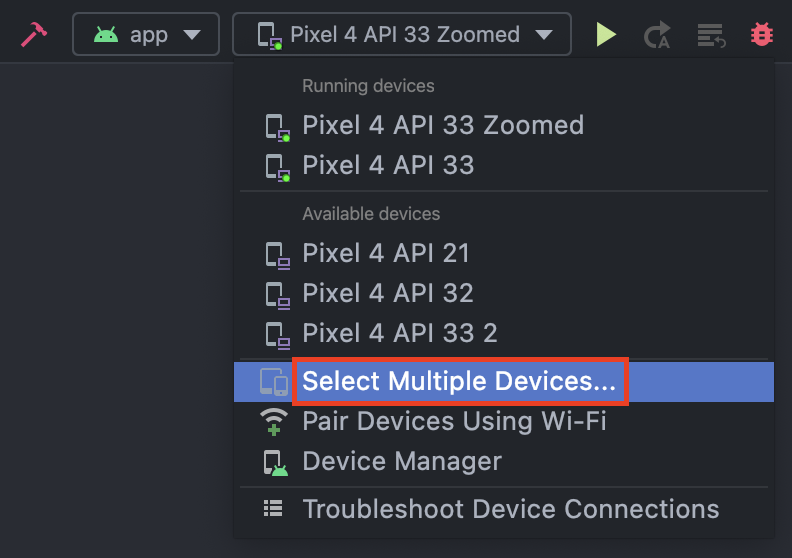 Running instrumented tests this way is very convenient during development, but there is a problem with this method when your tests are run on a remote build server: * …
## Introduction ## In Android projects, **DataSource** classes act as entry points to interacting with local or remote data sources. Their dependencies tend to be HTTP clients, the database, or DAOs, and their dependents are usually **Repository** classes. In this tutorial, we will learn how to provide a fake **DataSource** …
## Introduction ## If your App only need a simple way to play videos on Android, then **VideoView** (`android.widget.VideoView`) might just fit the bill. In this tutorial, we will learn how to use VideoView for video playback in our App. ## Goals ## At the end of the tutorial, you …
## Introduction ## When working with Room, there might come a situation during bulk CRUD operations that it would be useful to add a Foreign Key to one of our tables. This provides two main benefits: cascading delete (*must be configured manually*) and enforcing data integrity on linked entities. In …
## Introduction ## Coil is a popular image loading library for Kotlin-first Android projects. It is lightweight, fast and is super easy to use. In this tutorial, we will learn how to use Coil to load images into our project. ## Goals ## At the end of the tutorial, you …
## Introduction ## In this tutorial, we will learn how to capture a picture with the new **ActivityResult** APIs(`androidx.activity.result`), which replace the `startActivityForResult()` and `onActivityResult()` APIs(*from Activity class*). Additionally, we will also learn about the ContentProvider **FileProvider**, which we will have to set up to save our images. ## Goal …
## Introduction ## Navigation component is an abstraction on top of FragmentManager, which simplifies navigation between fragments. In this tutorial, we will learn how to use the Navigation component in our App. ## Goal ## At the end of the tutorial, you would have learned: 1. How to use the …
## Introduction ## In Android development, Intents are used to request an action from an app component. There are two types of Intents: explicit and implicit. Explicit Intents are used when you know the exact package name of the component you need started. Implicit Intents, however, do not need a …
## Introduction ## Snackbars are great for displaying brief messages providing feedback to your users. In this tutorial, we will learn how to create Snackbars. ## Goals ## At the end of the tutorial, you would have learned: 1. How to create a Snackbar. ## Tools Required ## 1. Android …

[COLOR="Red"][B]UPDATE: see author's comments after article[/B][/COLOR] When you develop for mobile devices these days, you pretty much have two paths you can take: You can use the OS manufacturer's SDK and develop native apps, or you can create an application that runs in the device's web browser. Developing for the …
When I was studying computer programming in college many years ago, I didn't imagine that our work could impact lives, particularly in a negative way. We've heard reports (mostly true) of death, dying, and destruction as a result of software problems, such as the time a plane flew right into …

So here, I am gonna to ask developers around which is the most popular language is used to develop a game for students or professionals.

Hey Guys, What problems might a business owner face during mobile app development?

I am looking to build a bakery app but i dont know is it good idea or not?
Hi all, I’m deciding between developing a native app (iOS/Android) or using a cross-platform framework like Flutter or React Native. What are the pros and cons in terms of cost, performance, and scalability? What do you recommend based on your experience?

## Introduction ## The release of Android 12 also came together with Material 3. Whether you love it or hate it, it is likely to be here to stay for a couple of years, therefore, it would be useful to know how to use it. In this tutorial, we will …
## Introduction ## In a previous tutorial, we learned [how to create a notification on Android](https://www.daniweb.com/programming/mobile-development/tutorials/536756/android-native-how-to-create-a-notification#post2282507). In that tutorial, we did not have to request any permission because applications did not need permission to post notifications on Android 12 and below. It has been almost a year since the release …
Hi All, I am Asif. I want to develop a mobile application in Android and iOS using Google AR spatial api. After running the sample applications in Google Code Labs, we are getting an error, VPS is not available in your region. Yes we know it is available mostly in …
"Hello everyone, I'm currently working on developing a shopping app, and I'd like to gather some insights from the community. What do you believe are the essential key features that should be considered when developing a shopping app? Your expertise and suggestions would be greatly appreciated. Thank you!"

It is difficult to predict with certainty which specific types of apps will be in demand in the future, as it depends on a variety of factors. However, considering recent trends, apps for games will continue to dominate and be the most demanded apps in the future followed by education …
## Introduction ## In a previous tutorial, we learned [how to set an exact alarm](https://www.daniweb.com/programming/mobile-development/tutorials/537920/android-native-how-to-launch-activity-from-an-exact-alarm). A permission called `SCHEDULE_EXACT_ALARM` was used in that tutorial. Initially, I thought that it was only a normal install-time permission, but I have recently found out that this specific permission also belongs to a rare …
## Introduction ## When working with ViewModels, instead of using the default, it is best practice that we inject coroutine dispatchers instead of hard-coding them. The reasoning behind this is that it is easier to switch to a testable dispatcher in tests. In this tutorial, we will learn how to …
## Introduction ## Every Android View has a `layoutParams` property. This property tells the parent ViewGroup how a View wants to be laid out; it is also often used to change the size of a View. In this tutorial, we will learn how to animate Views while modifying their `layoutParams`. …
## Introduction ## Cards are a common widget for Material 3-themed applications. Expanding a card after the user performs a click action is a very common behavior. While Android can automatically render the new expanded card automatically, we will have to implement our own animation if we want a smooth, …
## Introduction ## When working on Espresso tests, you might have run into a situation where you need to verify what your app does when an activity is in a specific [**Lifecycle**](https://developer.android.com/reference/androidx/lifecycle/Lifecycle) state. In this tutorial, we will learn how to achieve this by using the **ActivityScenario** class. ## Goals …
## Introduction ## When working with Room, you might have run into a situation where you only want to update specific fields of an entity instead of replacing the entire row. In this tutorial, we will learn how to do this in two different ways. ## Goals ## At the …
## Introduction ## On the android platform, widgets provide a quick way to interact with your Apps. They are extremely useful at providing quick information without the user launching the app Activities themselves. Common use cases for homescreen widgets are weather, email, or banking information. In this tutorial, we will …
## Introduction ## In this tutorial, we will learn how to use **ConcatAdapter**. It is a great choice for displaying header or footer at the beginning or at the end of a **RecyclerView**. ## Goals ## At the end of the tutorial, you would have learned: 1. How to use …
## Introduction ## Rather than modifying the button widget’s appearance in code, it is possible to do this in an XML resource instead. In this tutorial, we will learn how to create two different types of specialized XML resource files for changing the **Drawable** and the color. ## Goals ## …
## Introduction ## Among the many ways to create your own View, extending an existing View is the simplest option. This is because you are inheriting pre-made attributes, drawing, and accessibility features. In this tutorial, we will learn how to create our own custom View by extending an existing View …
## Introduction ## In this tutorial, we will learn how to apply Material 3 colors and Dynamic Colors to our App. ## Goals ## At the end of the tutorial, you would have learned: 1. How to apply Material 3 colors. 2. How to enable Dynamic Colors. ## Tools Required …
## Introduction ## In Android development, UseCases are classes that encapsulate business logic that are often used in ViewModel classes. UseCases belong to the optional Domain layer in Android apps, so they are not required, but can reduce your ViewModel’s complexity and make your application easier to test. In this …
## Introduction ## When working with WorkManager, it is important to know how to provide input data to your Workers. In this tutorial, we will learn how to provide basic input data to a Worker as well as when Workers are chained together. ## Goals ## At the end of …
## Introduction ## Android provides many ways to perform background tasks, such as Services, WorkManager, or even threads. In this tutorial, we will learn how to create a Service for our Android app. ## Goals ## At the end of the tutorial, you would have learned: 1. How to create …
## Introduction ## When working with music files, you might have wondered how to load display art from Audio files. In this tutorial, we will learn how to load thumbnails for audio files. ## Goals ## At the end of the tutorial, you would have learned: 1. How to load …
## Introduction ## In Android development, reusable layouts can be used to reduce duplicate code across XML files. In this tutorial, we will learn how to reuse layout files, especially with View Binding enabled. ## Goals ## At the end of the tutorial, you would have learned: 1. How to …
## Introduction ## MediaPlayer (`android.media.MediaPlayer`) is a popular way to play media files, and combining it with a SeekBar can greatly improve the user experience. In this tutorial, we will learn how to synchronize a MediaPlayer progress to a SeekBar position. ## Goals ## At the end of the tutorial, …
## Introduction ## When working with a Room database, we are mostly restricted to save data using primitives (*and boxed primitives*). Reference types are not supported right out of the box, but can be enabled by creating additional [TypeConverter](https://developer.android.com/reference/androidx/room/TypeConverter). If you are familiar with ORM-light frameworks such as Spring JDBC, …
## Introduction ## In this tutorial, we will learn how to add swipe-to-remove and drag-to-reorder functionalities into RecyclerView. ## Goals ## At the end of the tutorial, you would have learned: 1. How to add swipe-to-remove and drag-to-reorder functionality to a RecyclerView. ## Tools Required ## 1. Android Studio. The …
## Introduction ## If you are working on a native Android app using the View system, then you might have come across a situation where you would need to add a Composable (`androidx.compose.runtime.Composable`) into your View hierarchy. In this tutorial, we will learn how to add a Composable into an …
## Introduction ## If you are working with the latest Material 3 libraries on Android, you might have wondered how to use the **Bottom Navigation Bar** in your App. In this tutorial, we will learn how to use the Material 3 Bottom Navigation Bar (BNB). ## Goals ## At the …
## Introduction ## Proto DataStore is a great way to store the **permanent** state of your application, especially if you prefer type safety. In this tutorial, we will learn how to store our App state using the Proto DataStore. ## Goals ## At the end of the tutorial, you would …
## Introduction ## In Android development, Espresso can be combined with Junit to create powerful UI automation tests. In this tutorial, we will learn how to create Espresso tests. ## Goals ## At the end of the tutorial, you would have learned: 1. How to create Espresso tests. ## Tools …

## Introduction ## Notification is a great way to display information outside of your Android application. Your end users most likely already interact with notifications everyday, so knowing how to create notifications can greatly boost your user experience (*but can also backfire if used incorrectly*). In this tutorial, we will …
The End.